

Ever since I was a child I thought the speed shown in my PCS 286’s Setup was the processor’s. The Extended Set-Up has an option with three values, 12/12, 12/6 and 6/6, and I took it for granted that “12” was the 286’s megahertz and “6” a slow mode for old games.
Going over the emulation in BluMach, I found out it isn’t. And that wasn’t all.
What 12/12 means
The BIOS’s own text says so, although I had never noticed: Select frequency (RAM/IO). The first number is the memory frequency and the second is the expansion bus frequency, where the ISA cards go. The processor stays at 12 MHz in all three cases; what changes is how long it has to wait for the memory or the cards. The technical manual for the Triumph-Adler Dario 286, which uses the same board as the PCS 286, confirms it: the key changes the frequency “for memory and I/O clock” between 6 and 12 MHz.
In practice the effect is very similar to a Turbo button, which is why the confusion was so easy. But it isn’t the same thing: the processor doesn’t slow down, it just waits longer for the memory and the cards.
The three Olivetti machines I’ve looked at store that option differently:
- PCS 286 (BIOS 1.42): it’s stored in the CMOS and, at boot, the BIOS passes it to the keyboard controller with an Olivetti-specific command (on these machines, the keyboard controller also handled part of the board configuration).
- PCS 286/S with the TI board (BIOS 2.06): it’s stored in a different CMOS byte and programmed directly into the Texas Instruments chipset.
- PCS 386SX (BIOS 1.14): here there are three values, RAM, I/O and coprocessor: 16/8/16, 16/16/16 or 8/8/8. The 16 MHz I/O option is saved, but the BIOS never applies it.
The setting that went back to 12/12 on its own
Something odd happened on the emulated PCS 286: I’d choose 12/6, save, restart… and it was back on 12/12.
At first I thought I was saving it wrong. In the end I had to log every write to the CMOS. The Setup did save 12/6. What happened was that on the next boot the BIOS asked the keyboard controller about a board signal and, depending on its value, wrote the factory values back into those bytes, on every boot.
Those bytes hold the frequency, the keyboard language and the password. The Dario 286 technical manual documents a jumper called A11 “PASSWORT”, with two positions: password enabled or disabled. That signal is probably that jumper: in the “disabled” position, the BIOS clears the password on every boot and also resets the frequency and the language to the factory values. The emulator behaved as if the jumper were in that position, so none of it survived a restart. Now it behaves as if it were set to “enabled”.
The PCS 386SX BIOS does the same check, although I have no documentation for that board to confirm it.
Once that was fixed, another problem appeared on the PCS 386SX: when that signal changed, some virtual machines got stuck in the Setup with an “HDU 255” disk error. Those CMOS bytes had never been filled in, because the BIOS always overwrote them first. BluMach now repairs them once, with the same factory values the BIOS used to write.
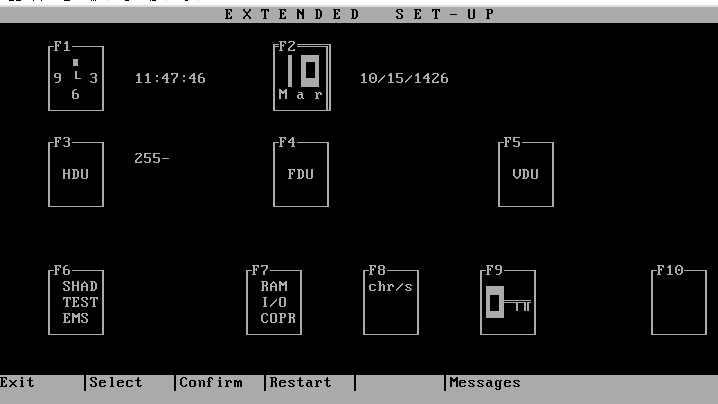
A floppy drive that could only be external
My real PCS 286 won’t let me set two floppy drives if it has a hard disk. The limitation exists, but it doesn’t come from the BIOS; it comes from the case.
The BIOS only offers drive B if it detected two floppy drives at boot. The case has two bays: if the hard disk takes one, there’s only room for one internal floppy drive. A second one could only be external, and then it does appear. BluMach always told the BIOS “there’s one”, with or without a disk. Now it reports however many the virtual machine has configured; with a hard disk, that amounts to having an external one.
Hidden options in the BIOS
The TI board’s BIOS 2.06 has text for choosing the shadow RAM size, splitting memory between extended and expanded, setting the buzzer volume, or setting the RAM, I/O and coprocessor frequencies separately. I expected to find them when I increased the virtual machine’s memory, but they never appear.
Disassembling the Setup shows why: no key leads to them. I believe that BIOS shares code with other Olivetti boards that did have those options, and that on this one they’re left over from those other boards. There’s nothing to emulate.
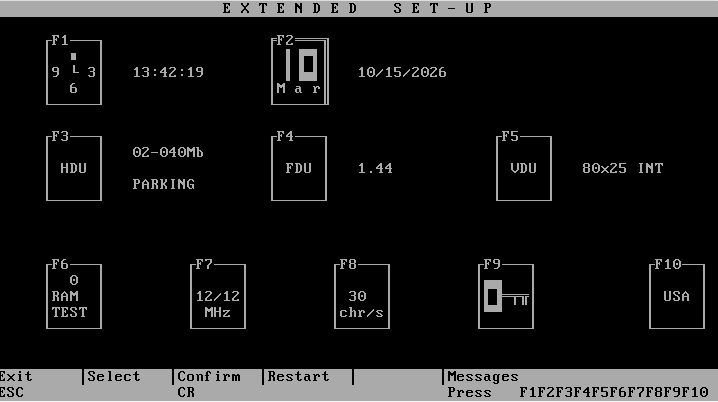
The PCS 386SX does have shadow RAM and EMS in its Setup. There the problem was the emulator itself, which rewrote those options on every boot. That’s fixed too, although I still need to check it properly.
What remains open
In BluMach, the frequency is now applied: the expansion bus runs at 12 or 6 MHz, and slow memory is simulated approximately, by doubling its access times. It isn’t an exact reproduction of the chipset; it’s the minimum needed for the slow modes to be noticeable.
One question remains that only the real machine can answer: in 6/6 mode, does the processor clock also drop, or only the memory and the bus? I have a PCS 286 at home and I plan to measure it, but that will be another day.
All of this is in BluMach 0.1.0-alpha.3. Each machine’s page, in the BluMach catalogue, notes what each Setup option stores and what the emulator does with it.