

An emulated machine that runs the BIOS and gets to DOS is good, a big milestone, but it doesn’t tell us whether it behaves like the real machine. I have a real Olivetti PCS 86, with its 8087, on my desk. One way to move the emulation forward is to watch what happens when you do the same thing on both, so I ran the same programs on them and compared.
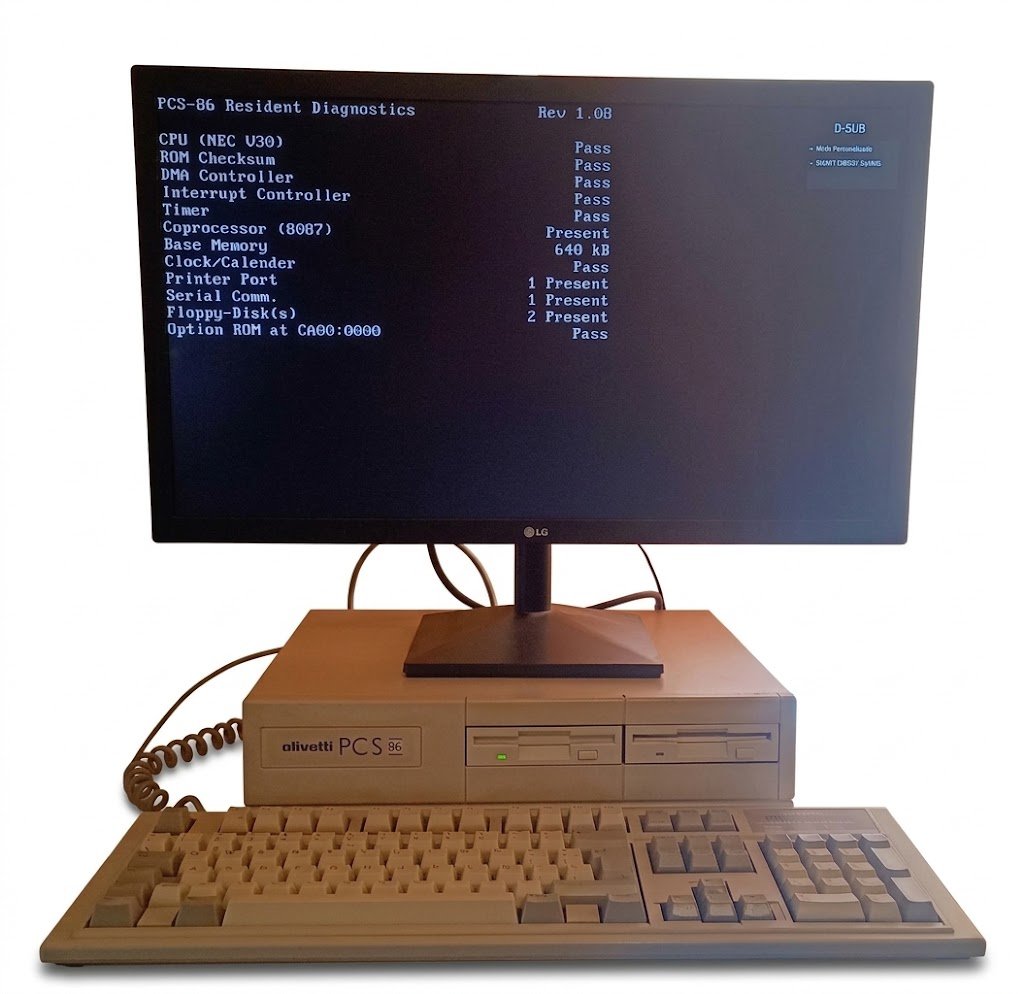
I already knew the emulator didn’t switch to the slow speed: it wasn’t implemented. What does that mean? For those who don’t know, many computers of the time had a turbo button to switch from the processor’s normal speed to a slower one, so you could use programs designed for earlier computers. On the Olivetti PCS 86 that switch is done with two utilities, GOSLOW.COM and GOFAST.COM, which come on the system floppy.
Along the way I also found three emulator bugs that stopped a benchmark (Check-It) from finishing, and some performance differences I still need to investigate.
All of this is in BluMach 0.1.0-alpha.3. The BluMach screenshots are from a development build earlier than that release.
GOFAST and GOSLOW
On the PCS 86 page in BluMach I had noted a doubt: Olivetti’s brochure says 10 MHz and John Elliott’s notes mention 8 MHz on their unit. Part of the answer was in the machine itself: with GOFAST and GOSLOW there isn’t a single figure, there are two. That doesn’t fully explain Elliott’s 8 MHz, but it does mean not every measurement has to match.
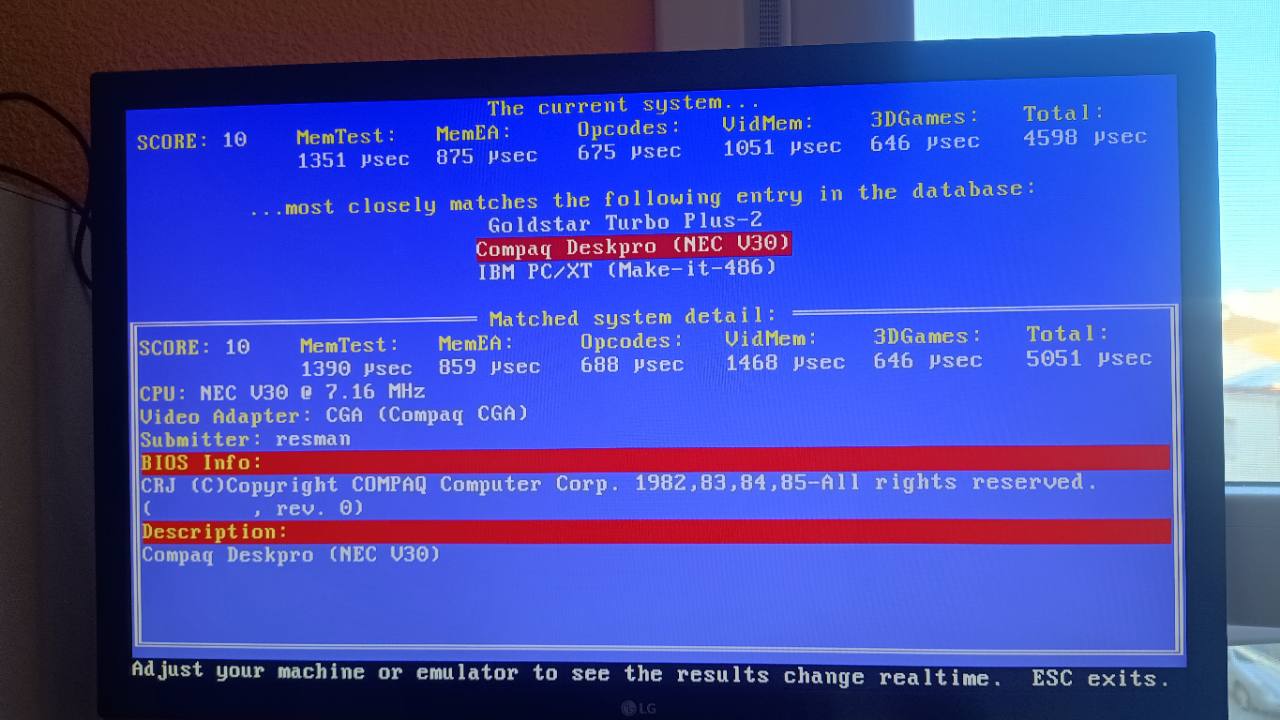
I ran both utilities on my PCS 86 and measured with Check-It 3.0 (the German version, which is the one I have). In fast mode it estimates 10.02 MHz and in slow mode 7.18 MHz. Landmark and TOPBENCH also see the change. These are software estimates, I haven’t measured the clock with an oscilloscope, but they agree quite well. And there’s a curious detail: in slow mode, TOPBENCH matches my PCS 86 with a Compaq Deskpro with an NEC V30 at 7.16 MHz from its database.
How do GOFAST and GOSLOW work? By writing to board registers: they open a transaction on port 6Ch, change the two high bits of 6Fh and close it. That’s how it’s now implemented in the emulator, which will be available in the next alpha. Also, changing the CPU speed doesn’t alter the timers or the other peripherals, which keep their own pace.
From 7.16 to 7.20 MHz
The first version of the slow mode used 7.16 MHz, which is what the measurements give. After comparing it with the real machine, I raised it to 7.20 MHz, 0.57% more, and fast mode stays at 10 MHz. It’s my own decision: I’d rather the slow mode run a hair above the real one than fall short. It isn’t a new PCS 86 specification; if I ever measure the actual clock, it will be corrected.
New machines are created at 10 MHz. If you already had a PCS 86 created at 9.54 MHz, it isn’t changed without warning: GOFAST goes back to the speed it was configured with.
The benchmark wouldn’t finish
When running Check-It in the emulator, the CPU and coprocessor test never finished, and I had no idea why. In the end it was related to the coprocessor. I fitted an 8087 to my PCS 86 back in the day and, as it happens, I had also ticked it on the emulated machine.
An interrupt that came back again and again. The NEC V30 interpreter serviced the non-maskable interrupt (NMI), but didn’t mark it as serviced. When it was re-enabled, it went in again for the same request, and so on until it ran out of stack and overwrote code.
A 2.0 that arrived as zero. With the NMI fixed, the 8087 found itself dividing by zero. In memory the divisor was 2.0, but the 64-bit value went through a 32-bit variable and lost half of it. Using a variable of the right size was enough.
A 285-cycle wait with a counter that topped out at 255. After that, the 8087 got stuck at step 6. The tangent (FPTAN) needs 285 cycles according to the emulator’s table, and the wait loop counted them with an 8-bit counter: on reaching 255 it wrapped back to zero and never got to 285. I widened it without shortening the wait.
With the three fixes, Check-It finishes the CPU and coprocessor tests in both modes. I haven’t disabled the 8087, added special cases for Check-It or cut timings to make it pass.
These bugs must have been in the inherited code for quite a while. They probably show up as hangs in programs that use the 8087 together with an NEC V30, and they’re hard to diagnose, especially if that exact combination doesn’t occur.
Check-It: the CPU matches, the 8087 doesn’t yet
These are the results with the 7.20 MHz adjustment:
| Mode and measurement | Real PCS 86 | BluMach | Difference |
|---|---|---|---|
| GOFAST · CPU (Dhrystones) | 1280 | 1280 | 0% |
| GOSLOW · CPU (Dhrystones) | 896 | 918 | +2.5% |
| GOFAST · 8087 (Whetstones) | 329.5K | 286.5K | −13.1% |
| GOSLOW · 8087 (Whetstones) | 236.7K | 215.9K | −8.8% |
Here, higher is better. K means thousands.
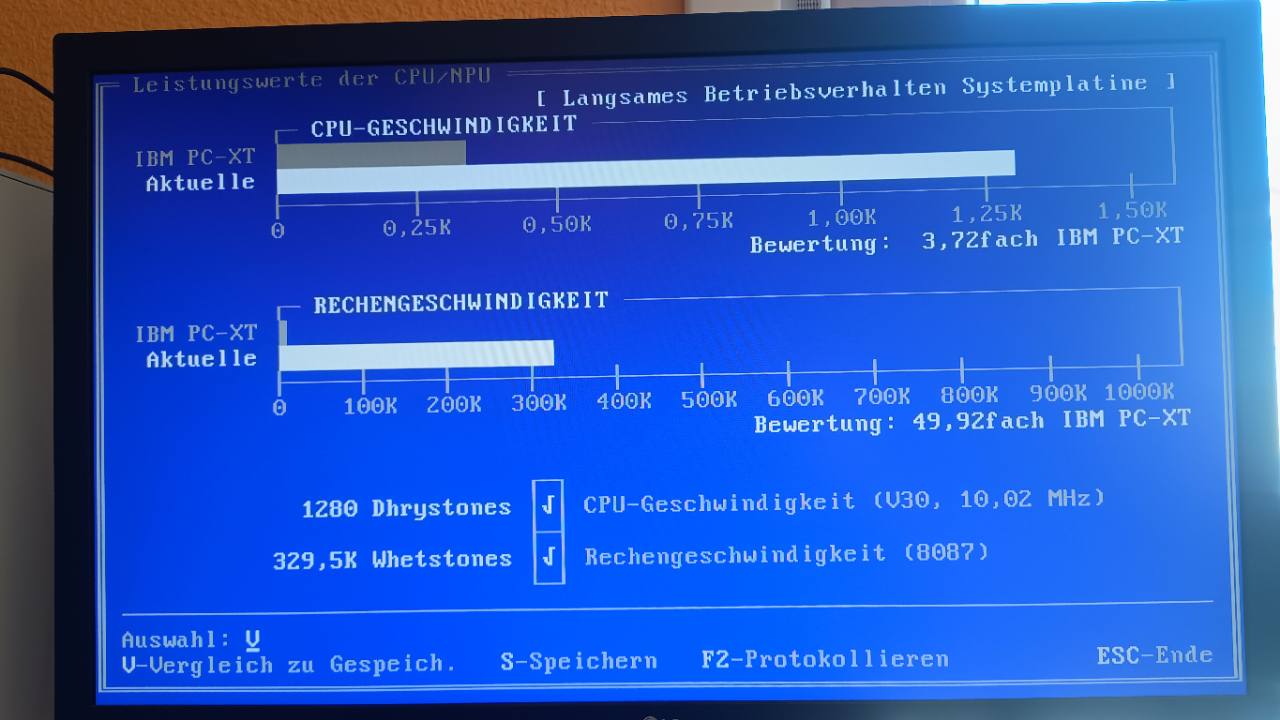
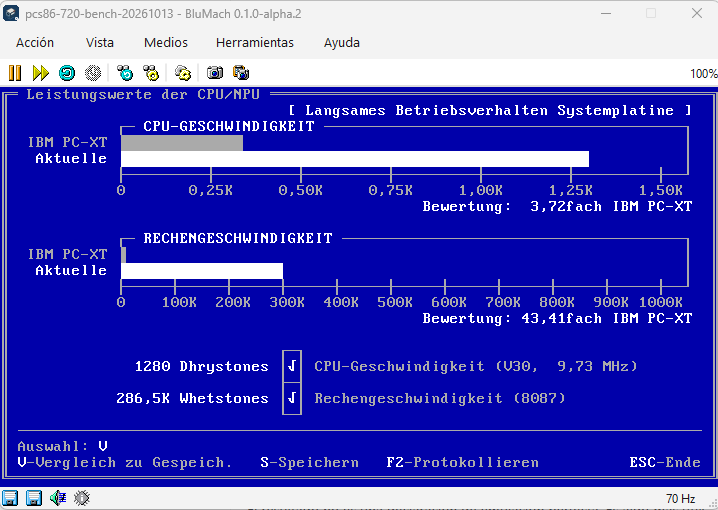
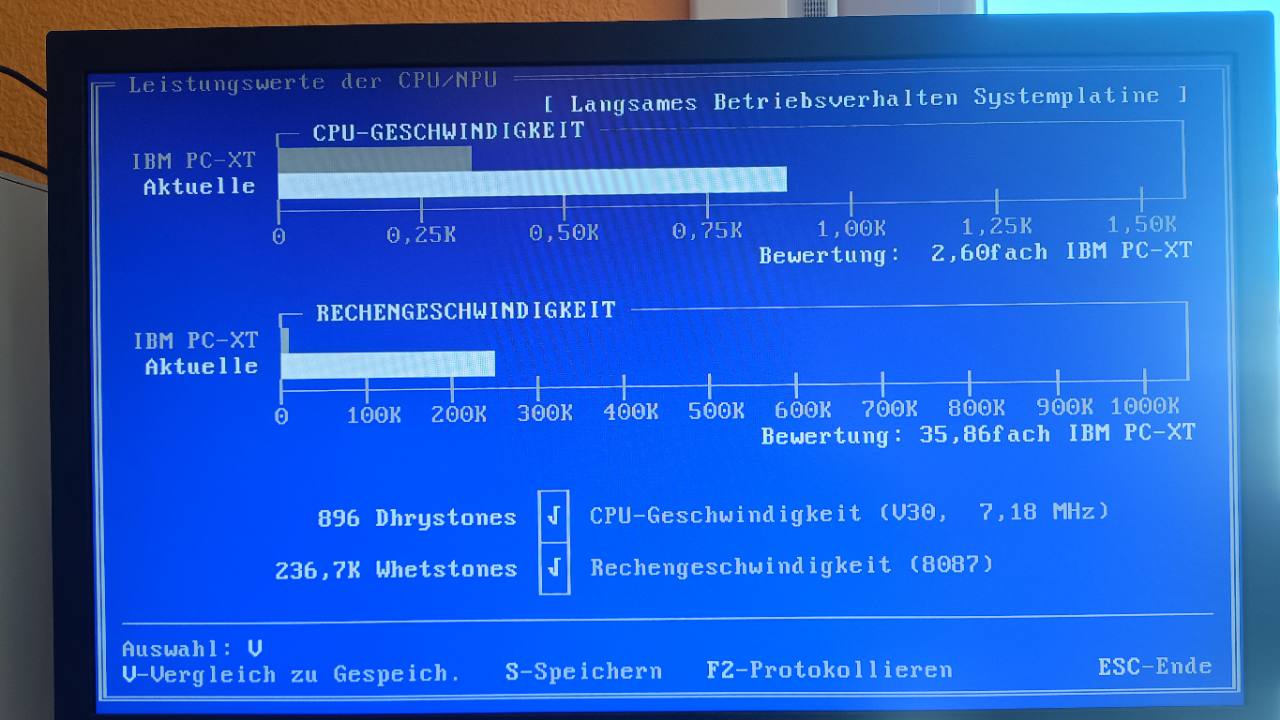
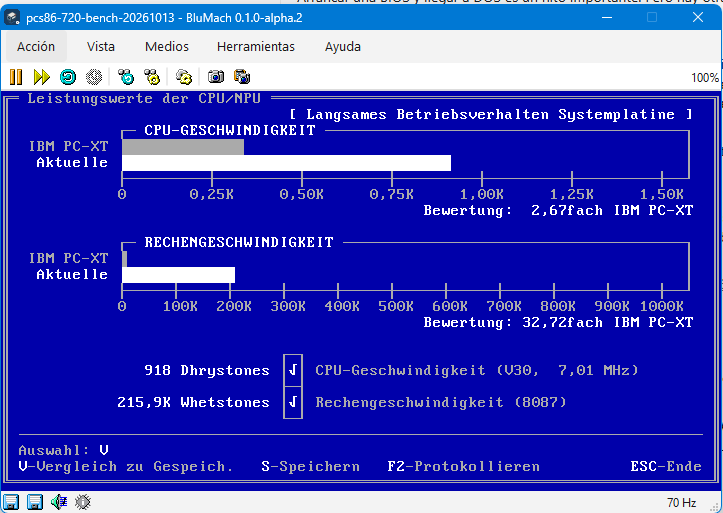
In fast mode, the CPU is spot on: 1280 Dhrystones on both. In slow mode it’s 2.5% above, which is what I was aiming for with the adjustment. Check-It estimating 7.01 MHz with the model set to 7.20 isn’t a contradiction: one is the program’s estimate and the other is the clock I give the emulator.
The 8087 is another story: it’s between 9 and 13% slower, and not by the same amount in both modes. I’m not going to raise the overall clock to make up for it, because the CPU already matches. The coprocessor will have to be looked at separately: its operations, how it works alongside the CPU, the bus and the wait states.
TOPBENCH: same score, different details
TOPBENCH measures more specific things, in microseconds. On the real machine I took the top row, “The current system”; what’s below is the closest machine in its database, not the Olivetti.
| GOFAST, in µs | Real PCS 86 | BluMach | Difference |
|---|---|---|---|
| MemTest | 950 | 1164 | +22.5% |
| MemEA | 613 | 670 | +9.3% |
| Opcodes | 476 | 475 | −0.2% |
| VidMem | 869 | 820 | −5.6% |
| 3DGames | 453 | 383 | −15.5% |
| Total | 3361 | 3512 | +4.5% |
Here it’s the other way round: fewer microseconds is faster. And faster doesn’t mean more faithful.
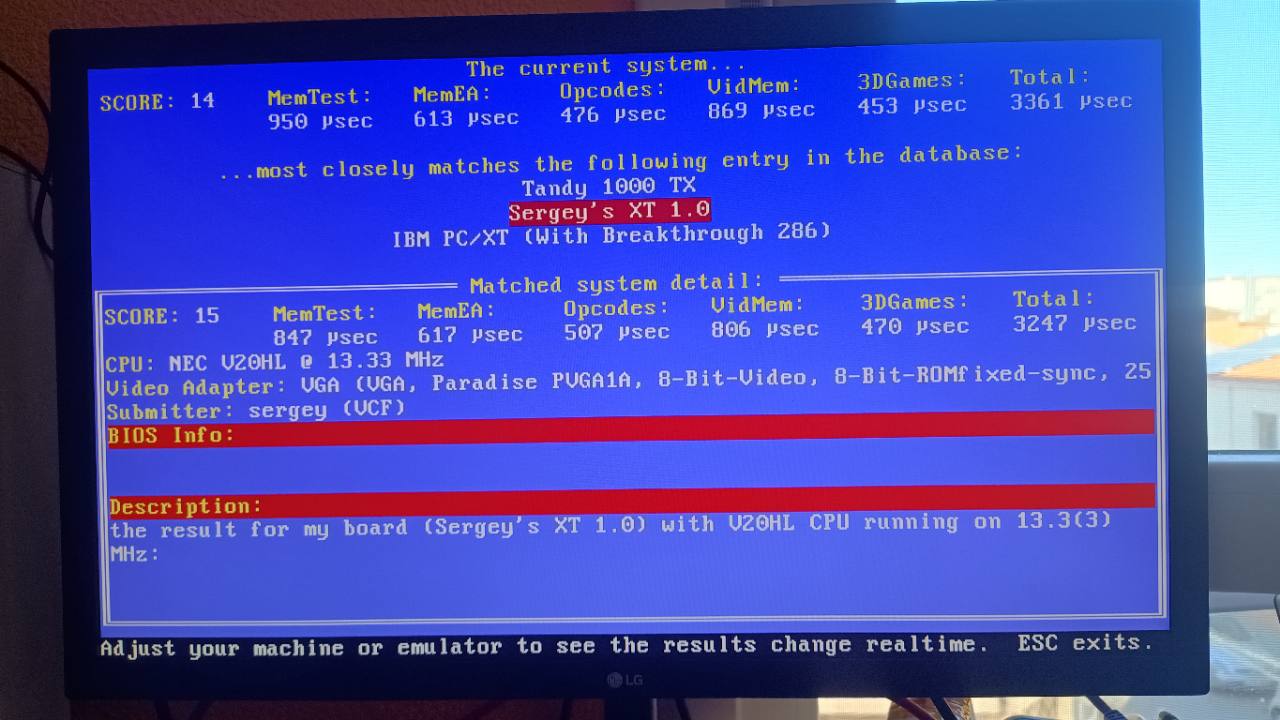
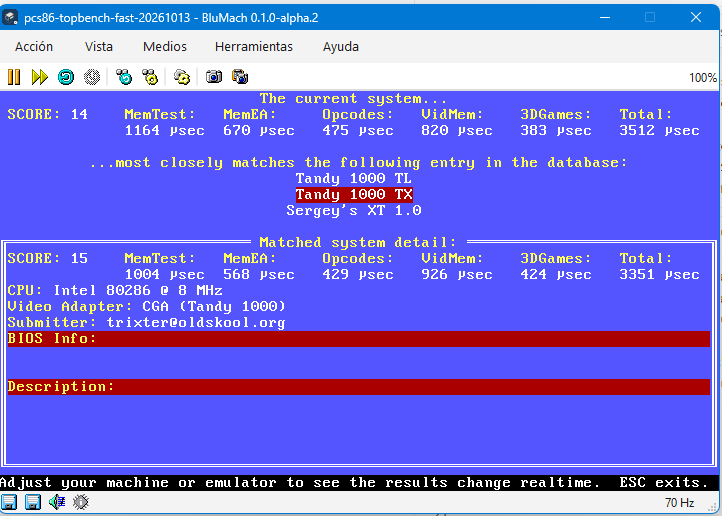
Both score 14, and the opcodes come out almost identical. But memory is slower in BluMach, and video and the 3D test are faster. Since the differences go in opposite directions, raising or lowering the clock wouldn’t fix them all at once: each component has to be looked at.
In slow mode, the real machine scores 10, like the emulator. For BluMach I only have the profile TOPBENCH gives with the /i option, which runs and returns to DOS, not the real machine’s continuous screen. So this comparison is provisional:
| GOSLOW, in µs | Real PCS 86 | BluMach (/i) | Difference |
|---|---|---|---|
| MemTest | 1351 | 1616 | +19.6% |
| MemEA | 875 | 931 | +6.4% |
| Opcodes | 675 | 661 | −2.1% |
| VidMem | 1051 | 1139 | +8.4% |
| 3DGames | 646 | 532 | −17.6% |
The odd one is video: in fast mode BluMach is 5.6% faster than the real machine, and in slow mode 8.4% slower. Another sign that video needs to be studied separately.
Figures that don’t move
In BluMach, the TOPBENCH values were so still that at first I thought it had hung. It hadn’t: it was still drawing and responded to Esc. On the real machine the readings wobble a little; in the emulator they repeat. That fits a very reproducible timing model, but it doesn’t mean all its timings are right.
What’s left
- Keep debugging, testing, trying…
- Understand why memory is slower and why video and 3D change depending on the mode.
- Measure the 8087 in more detail.