

There is finally something to download. It isn’t the whole of BluMach, far from it: it’s a first version with three machines, the Olivetti PCS, along with what I know works and what doesn’t.
It’s an alpha. It will fail, probably in places I haven’t tested, and that’s why I’m releasing it: so that someone other than me can run it on their computer and tell me what happens.
Before you download: BluMach does not include ROMs, BIOS files or operating systems. You’ll have to obtain them yourself; they are not distributed with the program.
What BluMach is
A fork of 86Box that presents the machines the way they were sold: with their factory configuration, their history and their manufacturer. I explain it in more detail in Opening the notebook and on the BluMach page.
What this release includes
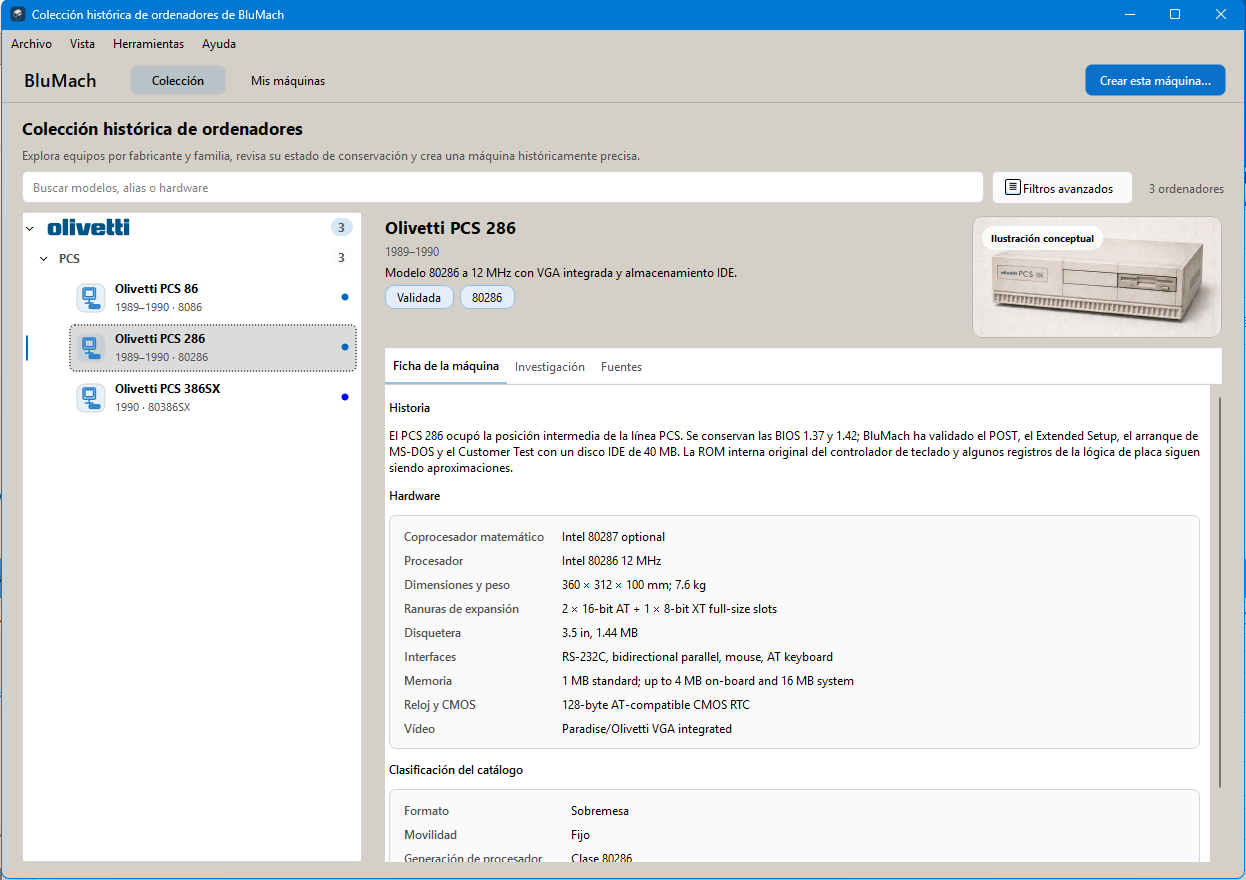
Three machines, the ones in the PCS family:
- Olivetti PCS 86: NEC V30 at 10 MHz, integrated VGA and XTA disk.
- Olivetti PCS 286: 80286 at 12 MHz, integrated VGA and IDE disk. It’s the machine where it all began.
- Olivetti PCS 386SX: 80386SX at 16 MHz, integrated VGA, IDE disk and optional 80387SX.
Each one has its page in Spanish, English, French, Italian and Portuguese, with its history, its technical data and where each piece of data comes from. When you create a machine, you’re offered the documented sales configurations, the ones that appear in Olivetti’s brochures. Upgrades, such as more memory or a sound card, are marked as such: I don’t present them as if Olivetti had sold them.
What has been checked and what hasn’t
“Checked” means I’ve seen it work myself, on my computer. It doesn’t mean the emulation is exact.
| Machine | Checked | Pending |
|---|---|---|
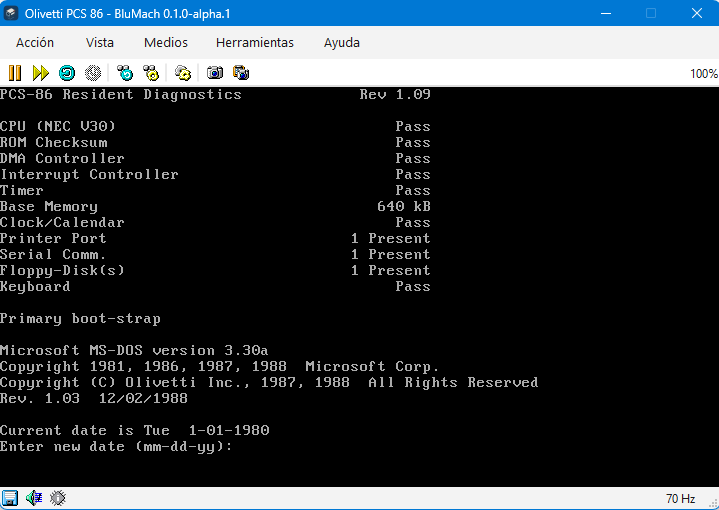
| PCS 86 | Resident diagnostics 1.09, MS-DOS boot, EMS memory, 20 MB XTA disk and Windows 3.0 installation | Mouse and sound |
| PCS 286 | POST, Extended Setup, MS-DOS boot and Customer Test with a 40 MB IDE disk | Dual floppy and 20 MB disk profiles, and sound |
| PCS 386SX | BIOS 1.14, Built-In Set-Up, MS-DOS boot with 1, 2, 4 and 8 MB and 80387SX | EMS, the Customer Utility's U_MGR module and sound |
The PCS 386SX is the least mature of the three: it boots and it’s usable, but it’s the one I’ve tested least.
How to try it
- Download version 0.1.0-alpha.1 from GitHub. It’s a build for 64-bit Windows.
- You’ll need each machine’s ROMs (as I said above, they don’t come with the program). If any firmware is missing, BluMach tells you instead of replacing it.
- You’ll need your own copy of MS-DOS. I ran my tests with Olivetti’s MS-DOS 3.30a.
- Create a PCS 286 with a 40 MB IDE disk. It’s the profile I’ve tested most and the best place to start.
- You should see the Phoenix 1.42 BIOS POST and then MS-DOS booting.
Windows may show the “Windows protected your PC” warning (SmartScreen) the first time you run BluMach, because the program isn’t signed. If you downloaded it from the release page on GitHub, click “More info” and then “Run anyway”.
What I know fails or haven’t tested
- I haven’t tested sound on any of the three. The cards on offer are upgrades someone might have fitted, not Olivetti configurations.
- Some parts are approximations: the keyboard controller’s internal ROM, some registers of the Headland chipsets and part of the board logic. They’re documented on each machine’s page.
- On the PCS 386SX, the Customer Utility’s U_MGR module hangs. I don’t know yet whether it’s the emulator’s fault or the floppy I have, which isn’t intact.
- I haven’t done any extensive software compatibility testing. If you try something, I’m as interested in what works as in what doesn’t.
If something fails
Open an issue on GitHub or write to me at [email protected]. It helps a lot if you tell me:
- which machine and which configuration you chose,
- what you did,
- what you expected and what happened,
- and, if you can, a screenshot.
And if you had one of these Olivettis or still have one, any information about the real machine is worth its weight in gold: photos of the board, manuals, floppies, anything.
Code and licence
BluMach is an independent project: it isn’t an official version of 86Box and it isn’t affiliated with Olivetti. It’s distributed under GPL-2.0-or-later, and the code for this release is in the repository’s v0.1.0-alpha.1 tag.
What comes next
First, finish what’s pending in this release with more testing. After that, the rest of the summer’s machines will arrive, little by little, with each update, as I wrote in The summer madness.